If you’re running Google Performance Max campaigns in 2026 and not actively using search themes and audience signals, you’re leaving performance on the table.
One of the most common misconceptions about Performance Max (PMax) is that it’s a “set it and forget it” campaign type. In reality, the best-performing PMax campaigns are the ones where advertisers clearly guide Google’s AI — without over-restricting it (something I commonly refer to as clipping the bird’s wings).
In this step-by-step guide to optimizing PMax with search themes and audience signals, you’ll learn:
- What search themes are and how they work
- How audience signals influence Performance Max optimization
- Best practices for conquesting vs brand defense
- Real-world examples from a highly competitive automotive environment
What Are Search Themes in Performance Max?
Search themes are high-level keyword signals that tell Google’s AI what types of searches matter most to your business.
Unlike traditional keywords:
- Search themes do not limit reach
- They guide intent, not match types
- They help PMax understand which searches to prioritize
Think of Search Themes As:
“Strong suggestions” for Google’s AI — not rules.
When used correctly, search themes dramatically improve:
- Query relevance
- Speed to learn
- Incremental performance
This is why “PMax search themes” has become one of the most searched optimization topics among advanced advertisers.
What Are Audience Signals in Performance Max?
Audience signals help Google’s machine learning understand who is most likely to convert — especially early in the learning phase.
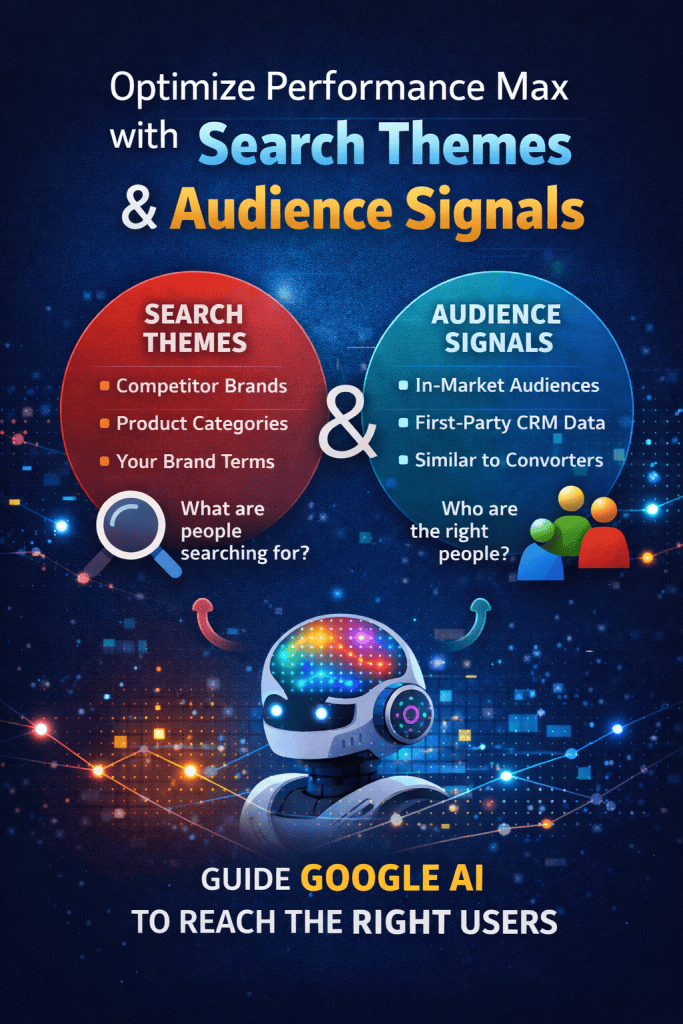
Audience signals can include:
- In-market audiences
- Affinity audiences
- First-party CRM lists
- Website visitors
- App users
- Customer Match lists
Important to note:
👉 Audience signals do not cap delivery
👉 They accelerate learning and improve efficiency
Google still expands beyond your signals — but it starts with your strongest data.
How Search Themes & Audience Signals Work Together
Search themes answer:
“What are people searching for?”
Audience signals answer:
“Who are the right people?”
When combined, they help Performance Max:
- Match intent to audience behavior
- Allocate spend across Search, YouTube, Display, Gmail, Discover, and Maps
- Scale conquesting or defense strategies intelligently
This combination is now central to modern PMax optimization.
VP Perspective: How We Used Search Themes & Signals to Win Conquesting Battles
In my role as a VP of Digital Marketing in the highly competitive automotive industry, Performance Max quickly became a core part of our conquesting strategy.
Automotive is brutal:
- High CPCs
- Heavy brand loyalty
- Aggressive competitors
We needed a way to reach high-intent shoppers who weren’t already loyal to us — and PMax gave us that leverage.
Our Conquesting Strategy Looked Like This:
1. Competitor Brand Search Themes
We used our competitors’ brand names as search themes.
This signaled to Google’s AI:
“People searching for these brands are highly valuable to us.”
Not to steal last-click brand traffic — but to identify intent signals that could be activated across all Google properties.
2. In-Market Audience Signals for Competitor Brands
We layered in:
- Google’s in-market audiences for “XYZ Brand”
- Auto intenders aligned with competitor models
This told the algorithm:
“Find people actively considering our competitors — even if they aren’t searching right now.”
3. Aggressive New Customer Bidding
We then activated:
- Bid higher for new customers, or
- Only bid for new customers (depending on budget aggressiveness)
This ensured:
- We weren’t paying to re-acquire existing brand loyalists
- Budget was focused on incremental growth
The result?
👉 Stronger conquesting efficiency
👉 Lower CPAs than standalone Search or Display
👉 Better scale across YouTube, Discover, Gmail, and Maps
Step-by-Step: How to Optimize PMax with Search Themes & Audience Signals
Step 1: Define Your Strategy (Conquesting vs Defense)
Before touching settings, ask:
- Are you trying to steal share?
- Or protect brand demand?
Your strategy determines everything else.
Step 2: Add High-Intent Search Themes
For conquesting:
- Competitor brand names
- Competitor product categories
- High-intent non-brand queries
For brand defense:
- Your brand name
- Product line names
- Dealer or location-based terms
🔑 Best practice:
Limit to 10–25 strong themes per asset group. Quality > quantity.
Step 3: Layer Audience Signals Strategically
For Conquesting:
- In-market for competitor brands
- Auto intenders
- Similar audiences to converters
- YouTube viewers of competitor content
For Brand Defense:
- First-party CRM lists
- Past purchasers
- Website visitors
- App users
💡 Pro Tip:
Use your CRM data aggressively. First-party signals are one of the strongest ways to guide PMax performance in 2026.
Step 4: Use New Customer Acquisition Bidding
If conquesting is your goal:
- Enable New Customer Acquisition
- Choose:
- “Bid higher for new customers” or
- “Only bid for new customers”
- “Bid higher for new customers” or
This is especially powerful when paired with competitor-based search themes and audience signals.
Step 5: Monitor Incrementality, Not Just CPA
With PMax optimization:
- Expect overlap with Search
- Focus on:
- New customers
- Assisted conversions
- Lift vs baseline performance
- New customers
PMax success isn’t about channel purity — it’s about business outcomes.
Brand Protection Strategy: Search Themes & Signals Done Right
Performance Max isn’t only for conquesting.
For brand defense, search themes and signals help:
- Control messaging
- Improve efficiency
- Reduce waste
Brand Defense Setup:
- Brand name search themes
- Product name themes
- CRM-based audience signals
- Exclude competitor conquesting signals
This ensures Google’s AI protects your core demand before expanding.
Best Practices for PMax Search Themes & Audience Signals
✅ Use search themes as intent signals, not keyword lists
✅ Always pair themes with audience signals
✅ Separate conquesting and defense strategies when possible
✅ Leverage CRM data — repeatedly
✅ Give campaigns time to learn (2–4 weeks minimum)
Why Search Themes Are Central to PMax in 2026
Google is clearly signaling where Performance Max is headed:
- Less manual control
- More AI guidance
- Stronger reliance on intent + audience signals
Search themes are no longer optional — they’re foundational.
From the perspective of someone who has had to win share in one of the most competitive categories in advertising, this approach works because it aligns with how people actually behave — not how marketers wish they did.
Final Thoughts: Guide the AI, Don’t Fight It
Performance Max performs best when you:
- Stop trying to out-control the system
- Start feeding it the right signals
Search themes and audience signals are how you teach Google’s AI what matters most — whether you’re conquesting competitors or defending your brand.
And in 2026, the marketers who win won’t be the ones clinging to old levers — they’ll be the ones who know how to lead the algorithm, not resist it.